-
2015-07-23
Git archive with submodules and tar magic
Git submodules are actually a very beautiful thing. You might prefer the word powerful or elegant, but that’s not the point. The downside is that they are sometimes misused, so as always, use with care. I’ve used them in projects … Continue reading →

-
2015-07-19
Headed to OSCON
Once again, time for the annual trek to Portland, Oregon for OSCON — perhaps for the last time! Next year, OSCON is going to be in Austin, TX — which seems like a bit of a mistake to me. Portland and OSCON go together like milk and cookies. If you’re going to be at OSCON, […]
-
2015-06-10
Looking for a Gluster Community Manager
Red Hat is looking for a Gluster Community Manager! Are you prepared to lead an army of ants into the cloud?
The Job Description
The role of a community manager is simple enough to define: Help your community to be wildly successful, grow new use…
-
2015-05-21
Looking Back on the Gluster Summit
On May 12 and 13th, the Gluster contributor community came together to discuss the state of Gluster and the plans for the future in sunny Barcelona, Spain. We had 32 active contributors present and 21 presentations. We discussed a wide range of materia…
-
2015-02-06
Collaborative Competition at FOSDEM
 As you walk down the crowded, narrow Rue des Bouchers on any given Brussels evening, you may find yourself assailed by restaurant barkers intent on getting you to swing into their establishment and dine on their fare. It’s not exactly a welcoming gesture, particularly when some of the barkers embrace the situation and just tell you flat out they want your money.
This past weekend, five kilometers to the south at the Université libre de Bruxelles, other crowded, narrow pathways were full of folks promoting a different sort of fare: free and open source software. If you don’t like crowds, FOSDEM would definitely a place to not be –except for the fact that so much goes on there. Far from unwelcoming, the sense of excitement and camaraderie at this annual event makes it a much more positive environment than similar events within FLOSS.
To describe FOSDEM to the newcomer is at once easy and frustrating –”big” certainly covers it, but doesn’t communicate the scope of an event that spans this small university in the heart of Brussels. The sheer variety of sessions alone are enough to feed the appetite of the most voracious FLOSS advocate.
oVirt certainly had its share of sessions in the conference program. From Gerrit to Gluster to smart VM scheduling, members of the oVirt community were out in force, educating attendees on the latest work being done in our project, as well as the tools and techniques we use to improve our process flow.
oVirt was also fortunate enough to have a booth in the event’s exhibition hall, smack-dab in-between the OpenStack and Puppet stands. Working alongside the OpenStack community folks was fun, given that many people tend to conflate the use cases for our two projects. But the proximity of our booths enabled us to explain to the many visitors who attended when and why would would want to use oVirt, and when an OpenStack solution like RDO would be a better fit.
Yes, free software projects do find themselves competing for mindshare and resources at times, but unlike the barkers of Rue des Bouchers, we’re not going to do it at the expense of the user’s wallet or valuable time. If a particular tool or platform works better for someone, we’d rather they use that happily instead of being unhappy with our offerings.
That doesn’t mean we’re not going to try to improve our own project, though. Self-awareness of problems and the self-discipline to improve them – these are the keys to open source and free software projects’ success. Not slick marketing and empty promises.
That’s never fare you should see at FOSDEM.
Follow the oVirt community on Twitter at @oVirt.
This article originally appeared on
community.redhat.com.
Follow the community on Twitter at
@redhatopen, and find us on
Facebook and
Google+. -
2015-02-04
Gearing Up for SCALE13x
FOSDEM is over, but a bunch of us are still in Europe this week for Infrastructure.Next, which is going on today in Ghent, and DevConf.cz in Brno this weekend. Planning ahead for later this month, you’ll find a bunch of us in sunny Los Angeles for the…
-
2015-01-26
Planning for Developer Conference 2015
Many of us are finalizing our FOSDEM plans and preparing to head to Brussels, then we’ll have a few days to recover before DevConf.cz starts in Brno. Planning ahead for DevConf.cz, here’s a preview of some of the upstream project talks.
After Tim Burke’s keynote, The Future of Red Hat, DevConf.cz attendees will have a schedule full of great technical talks to choose from, including:
CentOS
- Running a SIG in CentOS
- ABRT server – the resting place of crashed processes’ soul (includes statistics about crashes in Fedora and CentOS)
- CentOS for Fedora
- Open Build Service, good, bad and ugly
Ceph
Fedora
- Fedora Atomic
- Fedora and Red Hat Enterprise Linux Desktop
- Vagrant for your Fedora
- Using Fedora as a base for the IoT revolution
- Bootstrapping Fedora from zero
- Fedora: State of the Project
- Fedora Workstation Roadmap
- Automation in Fedora with Taskotron
- Google, ownCloud and your Fedora Workstation
- Bodhi2, MirrorManager2, progit, FAS3, anitya, the-new-coolness… What’s going on in Fedora infra?
- Fedora Server – Getting back to our roots
- Fedora Release Engineering Today
- Life of a Fedora Cloud image
- Discuss Environment and Stacks in Fedora
- SCE wide system assessment for upgrading Fedora
- Fedora Council Joint Session
Gluster
- GlusterFS – Architecture & Roadmap
- Automatically deploying GlusterFS with Puppet-Gluster+Vagrant
- Efficient data maintenance in GlusterFS using Databases
OpenShift
- golang – the Good, the Bad and the Ugly
- OpenShift v3
- OpenShift v3: Docker, Kubernetes & the power of Cross Community Collaboration
- Hacking Docker through OpenShft
oVirt
- oVirt Overview – Open-Source Product For Virtualization Management
- Integrating oVirt and Foreman to Empower your Data-Center
- The new oVirt Extension API – Taking AAA (Authentication Authorization Accounting) to the next level
Project Atomic
RDO
Plus talks on Using Ansible for community-managed infrastructure, Software Collections, delivering open source projects using Agile & DevOps thinking, and more.
See the full DevConf.cz schedule at: http://www.devconf.cz/schedule.
This article originally appeared on
community.redhat.com.
Follow the community on Twitter at
@redhatopen, and find us on
Facebook and
Google+. -
2014-12-07
Configured Zabbix to keep my server cool
Recently I got myself an APC NetShelterCX mini. It is a 12U rack, with integrated fans for cooling. At the moment it is populated with some ARM boards (not rack mounted), their PDUs, a switch and (for now) one 2U server. Surprisingly, the fans of the N…
-
2014-11-17
Testing GlusterFS with very fast disks on Fedora 20
In the past I used to test with RAM-disks, provided by /dev/ram*. Gluster uses extended attributes on the filesystem, that makes is not possible to use tmpfs. While thinking about improving some of the GlusterFS regression tests, I noticed that Fedora 20 (and possibly earlier versions too) does not provide the /dev/ram* devices anymore. I could not find the needed kernel module quickly, so I decided to look into the newer zram module.
Getting zram working seems to be pretty simple. By default one /dev/zram0 is made available after loading the module. But, if needed, the module offers a parameter num_devices to create more devices. After loading the module with modprobe zram, you can do the following to create your high-performance volatile storage:
# SIZE_2GB=$(expr 1024 * 1024 * 1024 * 2)
# echo ${SIZE_2GB} > /sys/class/block/zram0/disksize
# mkfs -t xfs /dev/zram0
# mkdir /bricks/fast
# mount /dev/zram0 /bricks/fast
With this mountpoint it is now possible to create a Gluster volume:
# gluster volume create fast ${HOSTNAME}:/bricks/fast/data
# gluster volume start fast
Once done with testing, stop and delete the Gluster volume, and free the zram like this:
# umount /bricks/fast
# echo 1 > /sys/class/block/zram0/reset
Of course, unloading the module with rmmod zram would free the resources too.
It is getting more important for Gluster to be prepared for very fast disks. Hardware like Fusion-io Flash drives and in future Persistent Memory/NVM will get more available in storage clouds, and of course we would like to see Gluster staying part of that!
-
2014-11-05
Installing GlusterFS 3.4.x, 3.5.x or 3.6.0 on RHEL or CentOS 6.6
With the release of RHEL-6.6 and CentOS-6.6, there are now glusterfs packages in the standard channels/repositories. Unfortunately, these are only the client-side packages (like glusterfs-fuse and glusterfs-api). Users that want to run a Gluster Server…
-
2014-11-05
GlusterFS 3.5.3beta2 is now available for testing
Even though GlusterFS 3.6.0 has been released last week, the 3.5 stable series continues to live on! The 2nd beta for GlusterFS 3.5.3 is now available for testing. Many bugs have been fixed since the 3.5.2 release, check the references below for detail…
-
2014-11-04
GlusterFS 3.6.0 – Looking Back and Looking Ahead..
GlusterFS 3.6.0 was released over the last weekend. As I mulled over the release cycle during the weekend, several thoughts on both on the technical and project fronts crossed my mind. This post is an attempt to capture some of those thoughts. On the technical front, several new features and significant number of bug fixes […]

-
2014-11-03
8th Bangalore Docker meetup and Global Hackathon#2
On 1st Nov’14, Red Hat offices in Bangalore and Pune hosted Docker meetups and Hackathon. ~40 people attended Bangalore meetup. Before the hackathon we had following presentations :- Docker Global Hackday opening by Avi Cavale, Co-founder and CEO, Shippable. Introduction to … Continue reading →
-
2014-10-31
Lots of Sweet Treats Packed into GlusterFS 3.6.0
GlusterFS 3.6.0 rolled out today and includes new features and stability improvements. Highlights include:
Better SSL Support
Erasure Coding
Volume snapshot
User serviceable snapshotsExperimental features include support for rdma volumes, …
-
2014-10-22
Gluster Volume Snapshot Howto
This article will provide details on how to configure GlusterFS volume to make use of Gluster Snapshot feature. As we have already discussed earlier that Gluster Volume Snapshot is based of thinly provisioned logical volume (LV). Therefore here I wi…
-
2014-10-18
Hacking out an Openshift app
I had an itch to scratch, and I wanted to get a bit more familiar with Openshift. I had used it in the past, but it was time to have another go. The app and the code are now available. … Continue reading →

-
2014-10-10
Continuous integration for Puppet modules
I just patched puppet-gluster and puppet-ipa to bring their infrastructure up to date with the current state of affairs… What’s new? Better README’s Rake syntax checking (fewer oopsies) CI (testing) with travis on git push (automatic testing for everyone) Use … Continue reading →

-
2014-10-07
Gluster Volume
GlusterFS
GlusterFS is an open source distributed file system. It incorporates automatic fail-over as a primary feature. All of this is accomplished without a centralized metadata server. Which also guarantees no single point of failure.
The detail documentation and getting started document can be found at Gluster.org. In this article I want to give an overview of Gluster so that you can understand GlusterFS volume snapshot better.
Let’s say you have some machines (or virtual machines) where you want to host GlusterFS. So the first thing you want to install is a POSIX compliant operating system, e.g. Fedora, CentOS, RHEL, etc. Install GlusterFS server on all these machines. Click here to get the detailed instruction on how to install GlusterFS. Once GlusterFS server is installed on each machine you have to start the server. Run the following command to start the GlusterFS server:
service glusterd start
Or, start the server using the following command:
glusterd
Now, you have multiple GlusterFS servers, but they are not part of the Gluster “Trusted Storage Pool” yet. All the servers should be part of the “Trusted Storage Pool” before they can be accessed. Lets say you have 3 servers, Host1, Host2, and Host3. Run the following command to add them to the Gluster Trusted Storage Pool.
[root@Host1]# gluster peer probe Host2
peer probe: successNow, Host1 and Host2 are in the Trusted Storage Pool. You can check the status of the peer probe using the peer status command.
[root@Host1]# gluster peer status
Number of Peers: 1
Hostname: Host2
Uuid: 3b51894a-6cc1-43d0-a996-126a347056c8
State: Peer in Cluster (Connected)If you have any problems during the peer probe, make sure that your firewall is not blocking Gluster ports. Preferably, your storage environment should be located on a safe segment of your network where firewall is not necessary. In the real world, that simply isn’t possible for all environments. If you are willing to accept the potential performance loss of running a firewall, you need to know the following. Gluster makes use of ports 24007 for the Gluster Daemon, 24008 for Infiniband management (optional unless you are using IB), and one port for each brick in a volume. So, for example, if you have 4 bricks in a volume, port 49152 – 49155 would be used . Gluster uses ports 34865 – 34867 for the inline Gluster NFS server. Additionally, port 111 is used for portmapper, and should have both TCP and UDP open.
Once Host1 and Host2 are part of the Trusted Storage Pool you have to add Host3 to the trusted storage pool. You should run the same gluster peer probe command from either Host1 or Host2 to add Host3 to the Trusted Storage Pool. You will see the following output when you check the peer status:
[root@Host1]# gluster peer status
Number of Peers: 2
Hostname: Host2
Uuid: 3b51894a-6cc1-43d0-a996-126a347056c8
State: Peer in Cluster (Connected)
Hostname: Host3
Uuid: fa751bde-1f34-4d80-a59e-fec4113ba8ea
State: Peer in Cluster (Connected)Now, you have a Trusted Storage Pool with multiple servers or nodes, but still we are not ready for serving files from the trusted storage pool. GlusterFS volume is the unified namespace through which an user can access his/her files on the distributed storage. A Trusted Storage Pool can host multiple volumes. And each volume is made up of one or more bricks. The brick provides a mapping between the local file-system and the Gluster volume.
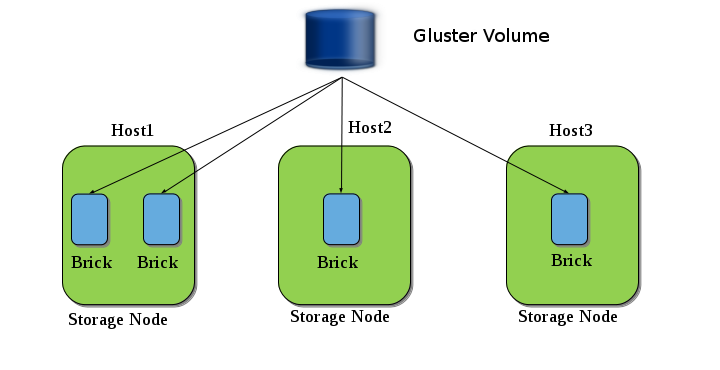
The above diagram shows an example of Gluster volume. Here we have three nodes (Host1, Host2 and Host3) and a Gluster Volume is created from the bricks present in those nodes.
Until now we have learned how to create a Trusted Pool, and now to create a volume you need to create bricks. These bricks can be a simple directory in your storage node, but to make use of snapshot feature these bricks have to adhere to some guidelines. In this document I provide you those guidelines and will take you through an example setup.
See guidelines for creating snapshot supportable volumes.
-
2014-10-05
GlusterFS 3.5.3beta1 has been released for testing
The first beta for GlusterFS 3.5.3 is now available for download.Packages for different distributions will land on the download server over the next few days. When packages become available, the package maintainers will send a notification to the glust…
-
2014-10-05
GlusterFS 3.5.3beta1 has been released for testing
The first beta for GlusterFS 3.5.3 is now available for download.Packages for different distributions will land on the download server over the next few days. When packages become available, the package maintainers will send a notification to the glust…

