-
2013-11-05
Recap of Gluster Community Day at USENIX LISA
Yesterday we had the opportunity to run a Gluster Community Day at USENIX LISA in Washington D.C. Turns out it was well worth the time, as we had a fantastic group turn up for some really excellent talks. The crowd wasn’t … Continue reading →
-
2013-11-04
Gluster Community Day, LISA 2013, Monday
I’m here at LISA 2013 at the Gluster Community Day. I’ve been asked by Joe Brockmeier to give a little recap about what’s been going on. So here it is! Wesley Duffee-Braun started off with a nice overview talk about … Continue reading →

-
2013-11-03
Speaking at LISA 2013 about Puppet and GlusterFS
I’m speaking at LISA 2013, the “Large Installation System Administration” conference. This conference runs all week in Washington. I’ll be giving two talks during the week, and attending at least one BOF. My first talk is on Monday during the … Continue reading →

-
2013-11-01
Install And Use SALTStack In A Mixed Environment
Install And Use SALTStack In A Mixed Environment
Salt is a new approach to infrastructure management. Easy enough to
get running in minutes, scalable enough to manage tens of thousands of
servers, and fast enough to communicate with them in seconds…. -
2013-10-30
DevOps in DC Intro to Ansible
Going all the way to Washington D.C. for USENIX LISA next week? There’s lots to do at LISA (hint: Red Hat events, Fedora events) but if you want to get out and meet some of the local DevOps type folks who might not be at LISA, you might want to check out the DevOpsDC meetup […]
-
2013-10-25
tmux > screen
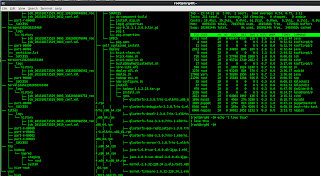
Never “exit” again. Why TMUX?
Even developers, in todays climate, have to deal with multiple deployment scenarios and environments. Some of use more than others — but in any case, every day, when I start work, I have to ssh into a VPN. Then, i have to ssh into 2 or 3 servers to check on them. I find myself creating new ssh terminals all day long and manually resizing them with my mouse.
And then when my ssh connection dies, i have to redo it all – and i lost my history 🙁Rather than managing your terminals manually, its best to install tmux on a server thats always on. At that point – you can simply ssh into the server and attach to your tmux session. Since tmux multiplexes your terminal windows for you, you never have to worry about losing connectivity – if you do – all your work is still in place on your server , and to get back to it, you just ssh in and run tmux attach.
Why another post on TMUX?
Sometimes the simplest way to get started is to follow a recipe that gets you started… So do this, and even if your ssh connection dies, you will never again have to worry about losing your terminal histories and neatly organized layouts.
The image in this post is an image of what you should end up with : 3 windows, all on a server , that you can switch back and forth between using [ctrl – b] + arrow keys.
Do this:
First install it:
    #Do something like this
    su -c 'rpm -Uvh http://mirror.steadfast.net/epel/6/x86_64/epel-release-6-8.noarch.rpm'
    yum install tmux
Now that its installed, create a new named session, and detach from it:
   tmux new -s mysession
   [ctrl + b] + d
   tmux attach -t mysession
FYI, a great summary is here of commands to customize your layout : http://lukaszwrobel.pl/blog/tmux-tutorial-split-terminal-windows-easily . C+P Here for convenience:
 -   Ctrl+b " - split pane horizontally.
 -   Ctrl+b % - split pane vertically.
 -   Ctrl+b arrow key - switch pane.
 -   Hold Ctrl+b, don't release it and hold one of the arrow keys - resize pane.
 -   Ctrl+b c - (c)reate a new window.
 -   Ctrl+b n - move to the (n)ext window.
 -   Ctrl+b p - move to the (p)revious window.
So lets create some tabs now.
[ctrl + b] + % #this creates a tab on the right side for you
[ctrl + b] ->  #this switches you into the right tab
[ctrl + b] "   #this further splits the right tab into another vertical terminal
And thats it !
Oh and dont forget this awesome trick that rearranges all your windows for you (hit it multiple times – and each time you get a different configuration).
[ctrl + b] <SPACE> #rearrange windows. keep spacing till you get the desired arrangement.
-
2013-10-25
The Great Gluster Euro Tour: London and Frankfurt, Oct 29 and 30
We’ve been pushing out more info about our upcoming Gluster Days next week in London on October 29 and Frankfurt on October 30. The agendas are solid – if you attend, you will have a very solid grasp of the Gluster Community, what you can do with GlusterFS, how do develop apps with it, and …Read more
-
2013-10-22
‘Software Defined Storage’ and ‘Open’: What the heck are they?
A few weeks ago, “Software Defined Storage” and “Open” were all the news in the “cloud” industry as EMC announced they had an “Open” “Software Defined Storage” solution. I heard the news and rolled my eyes. Yeah, right. … but I was busy with real lif…
-
2013-10-22
Keeping your VMs from going read-only when encountering a ping-timeout in GlusterFS
GlusterFS communicates over TCP. This allows for stateful handling of file descriptors and locks. If, however, a server fails completely, kernel panic, power loss, some idiot with a reset button… the client will wait for ping-timeout (42 by the defau…
-
2013-10-22
inotify-tools: Here’s what YARN does while your getting coffee.
As aweseome as HDFS is, the beauty of a FUSE mounted FileSystem is the fact that you can monitor everything using standard *inx utils (well – as long as they are happening locally at least, thanks martin for pointing that out – see comments below)…&n…
-
2013-10-20
first release of puppet-shorewall
Oh, hi there. In case you’re interested, I’ve just made a first release of my puppet-shorewall module. This isn’t meant as an exhaustive shorewall module, but it does provide most of the usual functionality that most users need. In particular, … Continue reading →

-
2013-10-18
GlusterFS 3.4.1 Packages for Ubuntu Saucy (13.10)
As a long-time Ubuntu user, I’ve worked to make sure that Debian and Ubuntu are first-class citizens in the Gluster Community. This is not without its challenges – most Gluster developers live in the Fedora/CentOS/RHEL hemisphere, and the GlusterFS version available in Ubuntu is a rather old 3.2.7, two major releases behind the latest and …Read more
-
2013-10-17
Red Hat Related Talks at LinuxCon + CloudOpen Europe
LinuxCon and CloudOpen Europe are just a few days away, and the line-up for talks looks really good. If you’re putting together your schedule, we have a couple of suggestions for talks that you’d probably find interesting. The full schedule … Continue reading →
-
2013-10-17
Gluster Community Congratulates OpenStack Developers on Havana Release
The Gluster Community would like to congratulate the OpenStack Foundation and developers on the Havana release. With performance-boosting enhancements for OpenStack Block Storage (Cinder), Compute (Nova) and Image Service (Glance), as well as a native template language for OpenStack Orchestration (Heat), the OpenStack Havana release points the way to continued momentum for the OpenStack community. …Read more
-
2013-10-17
Testing Fedora 20 Beta Cloud AMIs
Doing much work in the cloud? If so, I’d encourage you to take a few minutes to spin up the latest beta test candidate cloud image for Fedora 20. (This is not the final beta release, this is a candidate for the beta release that’s coming shortly.) You can grab the images for x86_64 or […]
-
2013-10-16
Automated Hadoop Deployment on GlusterFS with Apache Ambari
The glusterfs-hadoop team is pleased to announce that the Apache Ambari project now supports the automated deployment and configuration of Hadoop on top of GlusterFS. What is Apache Ambari? Apache Ambari is a browser based Hadoop Management Web UI that is used to provision, manage and monitor Hadoop clusters. Once Apache Ambari is installed on …Read more
-
2013-10-11
Gluster Workshop in Edinburgh at LinuxCon Europe
If you’re attending LinuxCon Europe, you’ll want to get signed up for the Gluster Workshop on Thursday, October 24th. The program starts at a very reasonable 10 a.m. This full-day, free workshop includes talks on using Gluster with OpenStack, KVM/QEMU, … Continue reading →
-
2013-10-11
Simplifying the distinction between SL4J and commons logging
This is why everyone uses SLF4J nowadays :)Here is how you track down and update your SLF4J Logging: First, scan the classpath for slf4j bindings.Then, make sure there is only one such binding.Finally, when you find what binding is being used: Co…
-
2013-10-10
Show current git branch in PS1 when branch is not master
Short post, long command… I’ve decided to start showing the current git branch in my PS1. However, since I don’t want to know when I’m on master, I had to write a new PS1 that I haven’t yet seen anywhere. … Continue reading →


